
Background 📃
First let’s understand the use cases to run docker inside a docker container.
Generally we build docker images in a VM which is a common approch. but recently, I was trying to create a Docker-based dynamic container as agent for the TeamCity Server, As a part of CI build, the pipeline will create a docker image inside the docker agent which i have integrated with the TeamCity Server.
Requirement
▶️ To full fill this requirement, the docker based agent should have a docker functionality in it.
▶️ There are three ways to achive it based on our environemt requirements.
Methods which i explored
Method 1 - Using docker.sock
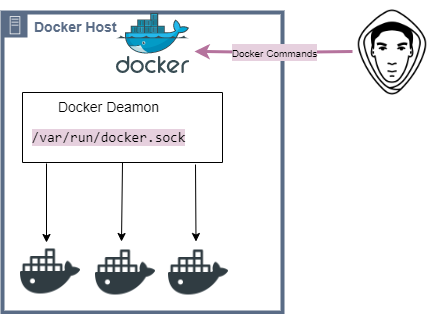
What is docker.sock ?
/var/run/docker.sock is the UNIX socket that Docker daemon is listening to. It’s the main entry point for Docker API. It also can be TCP socket but by default for security reasons Docker defaults to use UNIX socket. Docker cli client uses this socket to execute docker commands by default. If you are on the same host where Docker daemon is running, you can use the /var/run/docker.sock to manage containers.
Now to use docker functionality inside docker container, all you are have do is just run the docker container by mounting the docker.sock path as a volume inside the container.
Example
docker run -v /var/run/docker.sock:/var/run/docker.sock -ti <Imange-Name>
Risk Factor
This approch increases attack surface so you should be careful if you mount docker socket inside a container there are trusted codes running inside that container otherwise you can simply compromise your host that is running docker daemon, since Docker by default launches all containers as root.
Method 2 - Using Docker image with dind
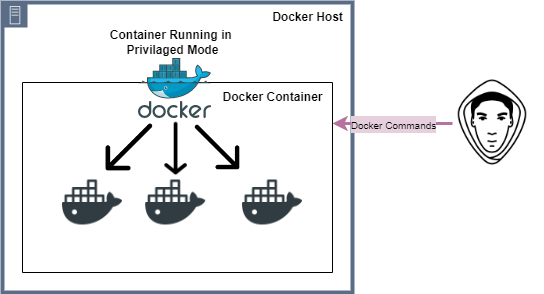 What is DinD Image ?
The official docker image with
What is DinD Image ?
The official docker image with dind tag is know as dind Image, used to run the docker container insinside docker container. This approch is used only to create a docker like environment creating docker image and to run the docker container indside container. If only building the docker image then it is recomended to use the first.
Requirement
▶️ Need official docker image with dind tag.
Example
docker run --privileged -d --name dind-test docker:dind
Risk Factor
This approch requires that the Docker daemon container be configured as a “privileged” container. Running a privileged container reduces isolation between the container and the underlying host and creates security risks, because the init process inside the container runs with the same privileges as the root user on the host.
It may be a viable (though risky) solution in trusted environments, but it’s not a viable solution in environments where you don’t trust the workloads running inside the DinD container. For this reason, use of DinD is generally not recommended by Docker (even though it’s officially supported).
Method 3 - Using Sysbox
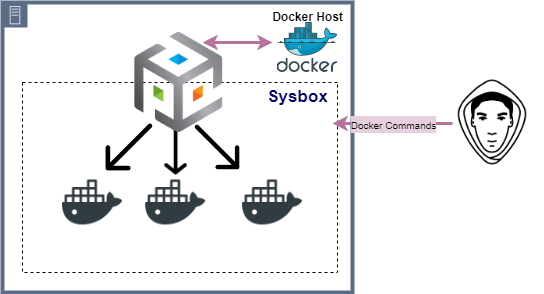 In the above two methods we can see the same kind of drawbacks, where we cannot use these approches in production environments because this significantly weakens isolation between the container and the underlying host, posing a strong security risk, but Sysbox is software that installs on the Linux host machine, integrates with Docker and run as System Container.
What is Sysbox ?
Sysbox is a open-source container runtime (“runc”) developed by Nestybox, which is now aquired by Docker Inc. Within a Nestybox system container you are able to run Docker inside the container easily and securely, with total isolation between the Docker inside the system container and the Docker on the host. No need for privileged containers anymore.
For more Info refer - link to nestybox
Requirement
▶️The Sysbox host must meet the following requirements:
It must be running one of the supported Linux distros and be a machine with a supported architecture (e.g., amd64, arm64).
Recommend a minimum of 4 CPUs (e.g., 2 cores with 2 hyperthreads) and 4GB of RAM. Though this is not a hard requirement, smaller configurations may slow down Sysbox.
Installing Sysbox The method of installation depends on the environment where Sysbox will be installed: To install Sysbox on a Kubernetes cluster, use the sysbox-deploy-k8s daemonset. Otherwise, use the Sysbox package for your distro. Alternatively, if a package for your distro is not yet available, you can build and install Sysbox from github source.
Running container in Sysbox
Running the system container is simple, it only requires passing the –runtime=sysbox-runc flag to Docker:
docker run --runtime=sysbox-runc -it --name sysbox-container -d docker:dind
Now we can build the docker image inside the container created.
Conclusion
▶️ Use dind and --privileged option methods (frist 2 mentods) only for POC or testing environemnt and get the nesassary approvals to create the same.
▶️ If you are planning to use Sysbox in Production, make sure you have tested with all its capabilites and limitations in your test environemt.
▶️ Using Sysbox we can also run Kubernetes Pods with certain limitimations, which i will explaining soon in my next post.